Factors in R

Introduction

Recall that a categorical variable contains information relating to group participation. Each possible category is called a level of the categorical variable. For example, a researcher might collect data on voter registration. The dataset could have a column called voter_registration which would contain information about all the respondents. There might be 4 levels of voter_registration such as: Democrat, Republican, Independent, and Not Affiliated. Each respondent would be in one of those levels.

R will typically treat any column with any letters in it as a string of characters. R does not interpret the meaning of those strings of characters and thus, without more instruction, orders them alphabetically.

There are times when we might want to give R additional instruction to improve our analyses and visualizations. This is where factors come in.

Factors

DEFINITION: A factor represents a categorical variable with a numerical coding and associated levels. It creates additional information about the variable that R uses for analyses and visualizations.

Factors are often used:

  1. To specify the order of the levels of a categorical variable
  2. To make sure R knows that a categorical variable is labeled with numerical values

The second situation is not always obvious when reviewing the data. You may have a column of data indicating random assignments of subjects into 5 treatment groups with levels 1, 2, 3, 4, or 5. It is important to instruct R to treat this categorical variable as categorical, not numeric. Failure to do so can lead to improper analysis and incorrect conclusions.

Creating a Factor Variable

Let’s revisit the survey of Portuguese students from 2 private schools.

# Load libraries and data

library(rio)
library(mosaic)
library(tidyverse)
library(car)

student <- read_csv('https://raw.githubusercontent.com/byuistats/Math221D_Cannon/master/Data/student_data_kaggle.csv')

glimpse(student)
Rows: 395
Columns: 33
$ school     <chr> "GP", "GP", "GP", "GP", "GP", "GP", "GP", "GP", "GP", "GP",…
$ sex        <chr> "F", "F", "F", "F", "F", "M", "M", "F", "M", "M", "F", "F",…
$ age        <dbl> 18, 17, 15, 15, 16, 16, 16, 17, 15, 15, 15, 15, 15, 15, 15,…
$ address    <chr> "U", "U", "U", "U", "U", "U", "U", "U", "U", "U", "U", "U",…
$ famsize    <chr> "GT3", "GT3", "LE3", "GT3", "GT3", "LE3", "LE3", "GT3", "LE…
$ Pstatus    <chr> "A", "T", "T", "T", "T", "T", "T", "A", "A", "T", "T", "T",…
$ Medu       <dbl> 4, 1, 1, 4, 3, 4, 2, 4, 3, 3, 4, 2, 4, 4, 2, 4, 4, 3, 3, 4,…
$ Fedu       <dbl> 4, 1, 1, 2, 3, 3, 2, 4, 2, 4, 4, 1, 4, 3, 2, 4, 4, 3, 2, 3,…
$ Mjob       <chr> "at_home", "at_home", "at_home", "health", "other", "servic…
$ Fjob       <chr> "teacher", "other", "other", "services", "other", "other", …
$ reason     <chr> "course", "course", "other", "home", "home", "reputation", …
$ guardian   <chr> "mother", "father", "mother", "mother", "father", "mother",…
$ traveltime <dbl> 2, 1, 1, 1, 1, 1, 1, 2, 1, 1, 1, 3, 1, 2, 1, 1, 1, 3, 1, 1,…
$ studytime  <dbl> 2, 2, 2, 3, 2, 2, 2, 2, 2, 2, 2, 3, 1, 2, 3, 1, 3, 2, 1, 1,…
$ failures   <dbl> 0, 0, 3, 0, 0, 0, 0, 0, 0, 0, 0, 0, 0, 0, 0, 0, 0, 0, 3, 0,…
$ schoolsup  <chr> "yes", "no", "yes", "no", "no", "no", "no", "yes", "no", "n…
$ famsup     <chr> "no", "yes", "no", "yes", "yes", "yes", "no", "yes", "yes",…
$ paid       <chr> "no", "no", "yes", "yes", "yes", "yes", "no", "no", "yes", …
$ activities <chr> "no", "no", "no", "yes", "no", "yes", "no", "no", "no", "ye…
$ nursery    <chr> "yes", "no", "yes", "yes", "yes", "yes", "yes", "yes", "yes…
$ higher     <chr> "yes", "yes", "yes", "yes", "yes", "yes", "yes", "yes", "ye…
$ internet   <chr> "no", "yes", "yes", "yes", "no", "yes", "yes", "no", "yes",…
$ romantic   <chr> "no", "no", "no", "yes", "no", "no", "no", "no", "no", "no"…
$ famrel     <dbl> 4, 5, 4, 3, 4, 5, 4, 4, 4, 5, 3, 5, 4, 5, 4, 4, 3, 5, 5, 3,…
$ freetime   <dbl> 3, 3, 3, 2, 3, 4, 4, 1, 2, 5, 3, 2, 3, 4, 5, 4, 2, 3, 5, 1,…
$ goout      <dbl> 4, 3, 2, 2, 2, 2, 4, 4, 2, 1, 3, 2, 3, 3, 2, 4, 3, 2, 5, 3,…
$ Dalc       <dbl> 1, 1, 2, 1, 1, 1, 1, 1, 1, 1, 1, 1, 1, 1, 1, 1, 1, 1, 2, 1,…
$ Walc       <dbl> 1, 1, 3, 1, 2, 2, 1, 1, 1, 1, 2, 1, 3, 2, 1, 2, 2, 1, 4, 3,…
$ health     <dbl> 3, 3, 3, 5, 5, 5, 3, 1, 1, 5, 2, 4, 5, 3, 3, 2, 2, 4, 5, 5,…
$ absences   <dbl> 6, 4, 10, 2, 4, 10, 0, 6, 0, 0, 0, 4, 2, 2, 0, 4, 6, 4, 16,…
$ G1         <dbl> 5, 5, 7, 15, 6, 15, 12, 6, 16, 14, 10, 10, 14, 10, 14, 14, …
$ G2         <dbl> 6, 5, 8, 14, 10, 15, 12, 5, 18, 15, 8, 12, 14, 10, 16, 14, …
$ G3         <dbl> 6, 6, 10, 15, 10, 15, 11, 6, 19, 15, 9, 12, 14, 11, 16, 14,…
Categorical variable stored as a number

The website indicates that traveltime is a categorical variable with 1 being less than 15 minutes, 2 is between 15 and 30 minutes, 3 indicates 30 minutes to 1 hour, and 4 is greater than 1 hour.

A glimpse() of the data shows <dbl> next to the row for traveltime which stands for “double” which is numerical data type.

If we want to make sure R treats this like a categorical variable and not a number, we can change it to a factor.

In the example below, we create a new dataset called new_student and use a mutate() statement to create a new column called traveltime_factor that changes the original traveltime variable into a factor.

new_student <- student %>%
  mutate(
    traveltime_factor = factor(traveltime)
  )

glimpse(new_student)
Rows: 395
Columns: 34
$ school            <chr> "GP", "GP", "GP", "GP", "GP", "GP", "GP", "GP", "GP"…
$ sex               <chr> "F", "F", "F", "F", "F", "M", "M", "F", "M", "M", "F…
$ age               <dbl> 18, 17, 15, 15, 16, 16, 16, 17, 15, 15, 15, 15, 15, …
$ address           <chr> "U", "U", "U", "U", "U", "U", "U", "U", "U", "U", "U…
$ famsize           <chr> "GT3", "GT3", "LE3", "GT3", "GT3", "LE3", "LE3", "GT…
$ Pstatus           <chr> "A", "T", "T", "T", "T", "T", "T", "A", "A", "T", "T…
$ Medu              <dbl> 4, 1, 1, 4, 3, 4, 2, 4, 3, 3, 4, 2, 4, 4, 2, 4, 4, 3…
$ Fedu              <dbl> 4, 1, 1, 2, 3, 3, 2, 4, 2, 4, 4, 1, 4, 3, 2, 4, 4, 3…
$ Mjob              <chr> "at_home", "at_home", "at_home", "health", "other", …
$ Fjob              <chr> "teacher", "other", "other", "services", "other", "o…
$ reason            <chr> "course", "course", "other", "home", "home", "reputa…
$ guardian          <chr> "mother", "father", "mother", "mother", "father", "m…
$ traveltime        <dbl> 2, 1, 1, 1, 1, 1, 1, 2, 1, 1, 1, 3, 1, 2, 1, 1, 1, 3…
$ studytime         <dbl> 2, 2, 2, 3, 2, 2, 2, 2, 2, 2, 2, 3, 1, 2, 3, 1, 3, 2…
$ failures          <dbl> 0, 0, 3, 0, 0, 0, 0, 0, 0, 0, 0, 0, 0, 0, 0, 0, 0, 0…
$ schoolsup         <chr> "yes", "no", "yes", "no", "no", "no", "no", "yes", "…
$ famsup            <chr> "no", "yes", "no", "yes", "yes", "yes", "no", "yes",…
$ paid              <chr> "no", "no", "yes", "yes", "yes", "yes", "no", "no", …
$ activities        <chr> "no", "no", "no", "yes", "no", "yes", "no", "no", "n…
$ nursery           <chr> "yes", "no", "yes", "yes", "yes", "yes", "yes", "yes…
$ higher            <chr> "yes", "yes", "yes", "yes", "yes", "yes", "yes", "ye…
$ internet          <chr> "no", "yes", "yes", "yes", "no", "yes", "yes", "no",…
$ romantic          <chr> "no", "no", "no", "yes", "no", "no", "no", "no", "no…
$ famrel            <dbl> 4, 5, 4, 3, 4, 5, 4, 4, 4, 5, 3, 5, 4, 5, 4, 4, 3, 5…
$ freetime          <dbl> 3, 3, 3, 2, 3, 4, 4, 1, 2, 5, 3, 2, 3, 4, 5, 4, 2, 3…
$ goout             <dbl> 4, 3, 2, 2, 2, 2, 4, 4, 2, 1, 3, 2, 3, 3, 2, 4, 3, 2…
$ Dalc              <dbl> 1, 1, 2, 1, 1, 1, 1, 1, 1, 1, 1, 1, 1, 1, 1, 1, 1, 1…
$ Walc              <dbl> 1, 1, 3, 1, 2, 2, 1, 1, 1, 1, 2, 1, 3, 2, 1, 2, 2, 1…
$ health            <dbl> 3, 3, 3, 5, 5, 5, 3, 1, 1, 5, 2, 4, 5, 3, 3, 2, 2, 4…
$ absences          <dbl> 6, 4, 10, 2, 4, 10, 0, 6, 0, 0, 0, 4, 2, 2, 0, 4, 6,…
$ G1                <dbl> 5, 5, 7, 15, 6, 15, 12, 6, 16, 14, 10, 10, 14, 10, 1…
$ G2                <dbl> 6, 5, 8, 14, 10, 15, 12, 5, 18, 15, 8, 12, 14, 10, 1…
$ G3                <dbl> 6, 6, 10, 15, 10, 15, 11, 6, 19, 15, 9, 12, 14, 11, …
$ traveltime_factor <fct> 2, 1, 1, 1, 1, 1, 1, 2, 1, 1, 1, 3, 1, 2, 1, 1, 1, 3…

Notice the glimpse() of the new dataset has a new column called traveltime_factor that has <fct> next to it indicating that this is a factor data type.

At this point, we can use the new factor column for our analyses and visualizations and R will treat it correctly.

I can see what all the levels of this factor are by using the levels() function as follows:

levels(new_student$traveltime_factor)
[1] "1" "2" "3" "4"

Changing the order of levels of a character string

By default, R treats any text information as a string of characters and orders them alphabetically. We can use factors to specify the order of the levels of the categorical variable.

For example, consider the reason column of data indicating the reason families chose these schools. While reason is a categorical variable, the glimpse() shows it as a <chr> data type, meaning it is a character string.

The table() function gives the frequency of occurrence for each of the reasons.

table(student$reason)

    course       home      other reputation 
       145        109         36        105 

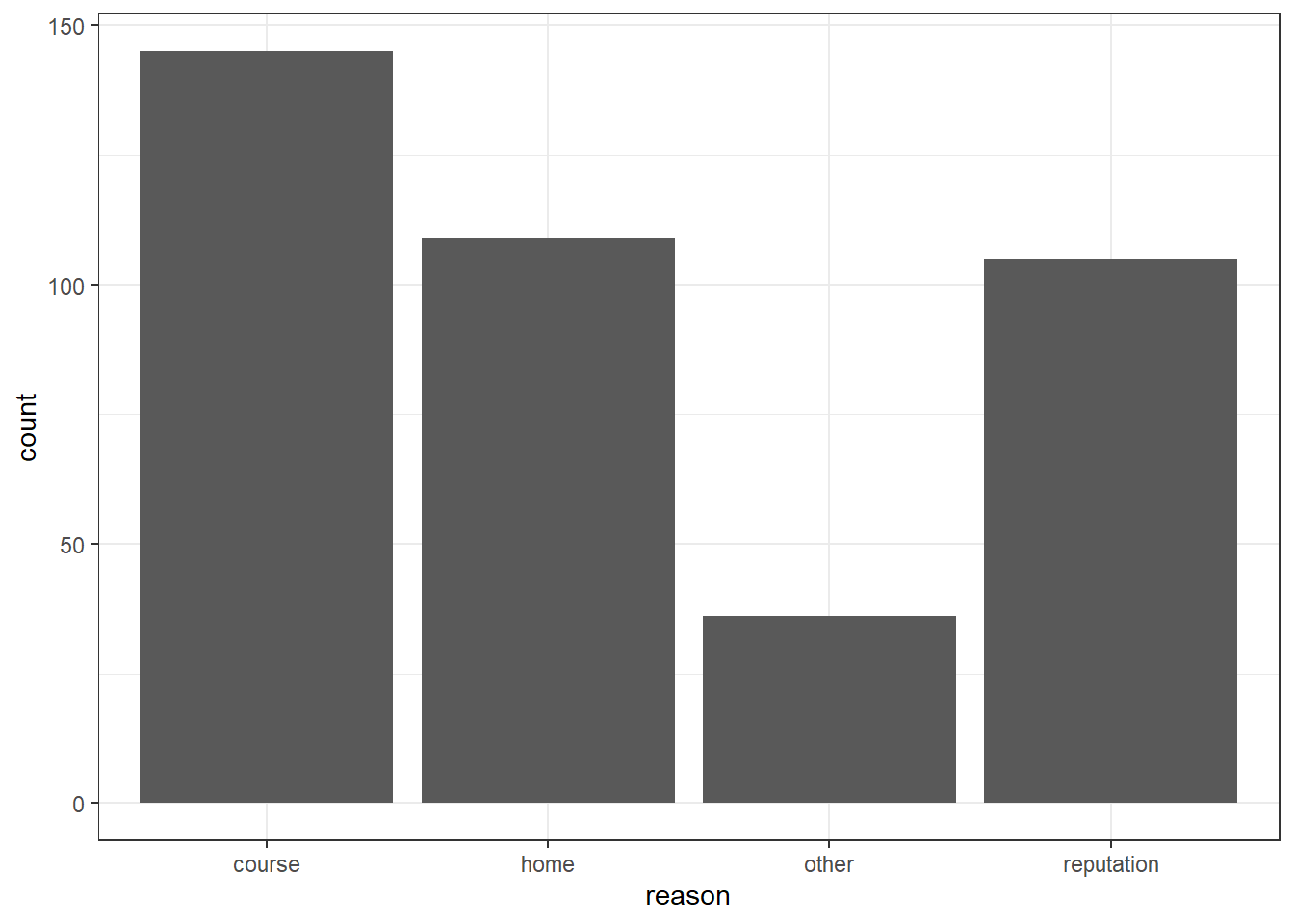
The bar plot also arranges the bars alphabetically:

ggplot(data = student, mapping = aes(x = reason)) +
  geom_bar() +
  theme_bw()

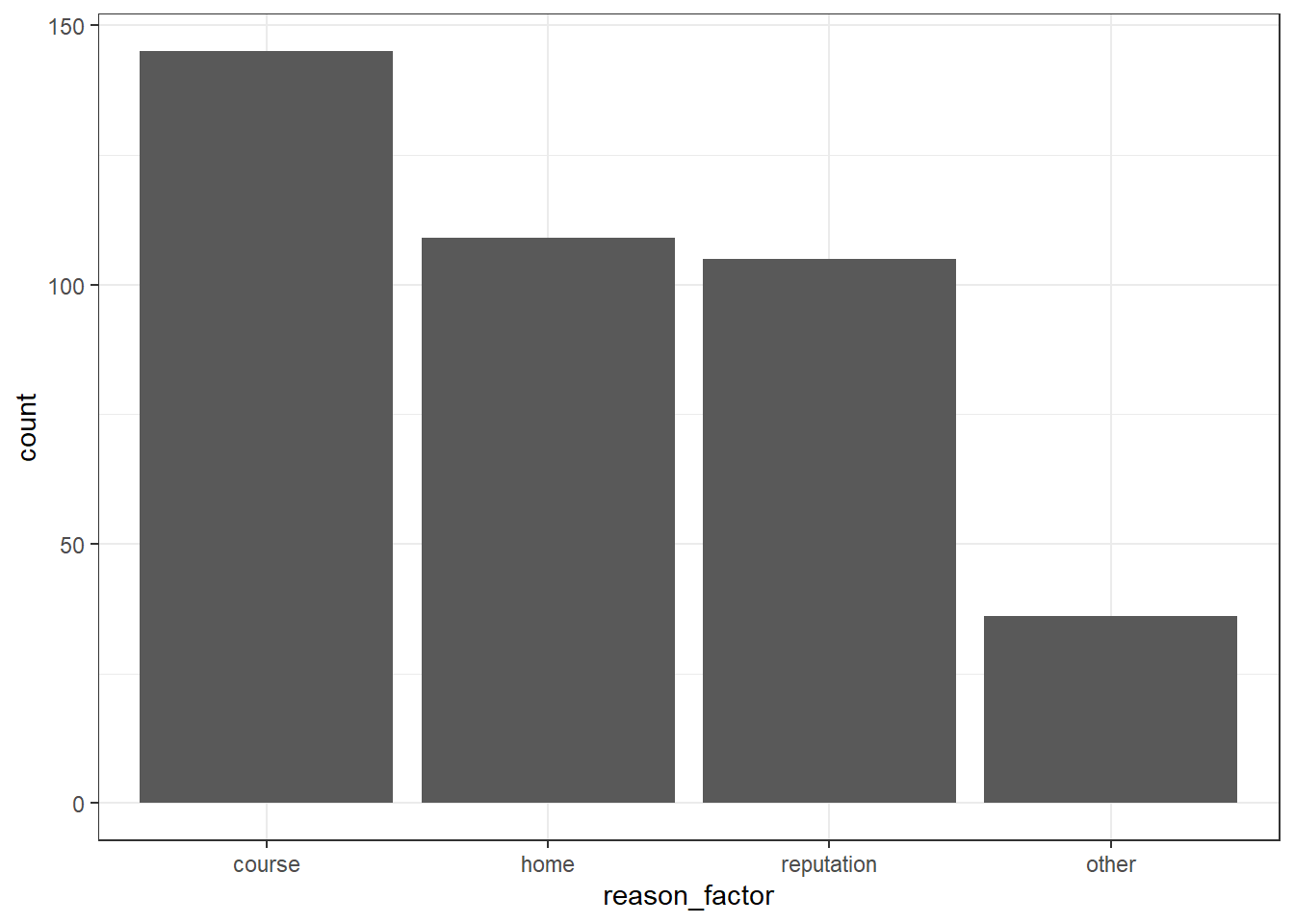
Suppose we want to put the other category at the end. We can use the factor() function to specify the order of the levels by including an input for levels = c(). The list, c(), must include all the levels of the variable or it will create missing values.

The following code chunk creates a new dataset and uses a mutate statement to create a new column called reason_factor that also specifies the order of the levels:

new_student <- student %>%
  mutate(
    traveltime_factor = factor(traveltime), 
    reason_factor = factor(reason, levels = c("course", "home", "reputation", "other"))
  )

glimpse(new_student)
Rows: 395
Columns: 35
$ school            <chr> "GP", "GP", "GP", "GP", "GP", "GP", "GP", "GP", "GP"…
$ sex               <chr> "F", "F", "F", "F", "F", "M", "M", "F", "M", "M", "F…
$ age               <dbl> 18, 17, 15, 15, 16, 16, 16, 17, 15, 15, 15, 15, 15, …
$ address           <chr> "U", "U", "U", "U", "U", "U", "U", "U", "U", "U", "U…
$ famsize           <chr> "GT3", "GT3", "LE3", "GT3", "GT3", "LE3", "LE3", "GT…
$ Pstatus           <chr> "A", "T", "T", "T", "T", "T", "T", "A", "A", "T", "T…
$ Medu              <dbl> 4, 1, 1, 4, 3, 4, 2, 4, 3, 3, 4, 2, 4, 4, 2, 4, 4, 3…
$ Fedu              <dbl> 4, 1, 1, 2, 3, 3, 2, 4, 2, 4, 4, 1, 4, 3, 2, 4, 4, 3…
$ Mjob              <chr> "at_home", "at_home", "at_home", "health", "other", …
$ Fjob              <chr> "teacher", "other", "other", "services", "other", "o…
$ reason            <chr> "course", "course", "other", "home", "home", "reputa…
$ guardian          <chr> "mother", "father", "mother", "mother", "father", "m…
$ traveltime        <dbl> 2, 1, 1, 1, 1, 1, 1, 2, 1, 1, 1, 3, 1, 2, 1, 1, 1, 3…
$ studytime         <dbl> 2, 2, 2, 3, 2, 2, 2, 2, 2, 2, 2, 3, 1, 2, 3, 1, 3, 2…
$ failures          <dbl> 0, 0, 3, 0, 0, 0, 0, 0, 0, 0, 0, 0, 0, 0, 0, 0, 0, 0…
$ schoolsup         <chr> "yes", "no", "yes", "no", "no", "no", "no", "yes", "…
$ famsup            <chr> "no", "yes", "no", "yes", "yes", "yes", "no", "yes",…
$ paid              <chr> "no", "no", "yes", "yes", "yes", "yes", "no", "no", …
$ activities        <chr> "no", "no", "no", "yes", "no", "yes", "no", "no", "n…
$ nursery           <chr> "yes", "no", "yes", "yes", "yes", "yes", "yes", "yes…
$ higher            <chr> "yes", "yes", "yes", "yes", "yes", "yes", "yes", "ye…
$ internet          <chr> "no", "yes", "yes", "yes", "no", "yes", "yes", "no",…
$ romantic          <chr> "no", "no", "no", "yes", "no", "no", "no", "no", "no…
$ famrel            <dbl> 4, 5, 4, 3, 4, 5, 4, 4, 4, 5, 3, 5, 4, 5, 4, 4, 3, 5…
$ freetime          <dbl> 3, 3, 3, 2, 3, 4, 4, 1, 2, 5, 3, 2, 3, 4, 5, 4, 2, 3…
$ goout             <dbl> 4, 3, 2, 2, 2, 2, 4, 4, 2, 1, 3, 2, 3, 3, 2, 4, 3, 2…
$ Dalc              <dbl> 1, 1, 2, 1, 1, 1, 1, 1, 1, 1, 1, 1, 1, 1, 1, 1, 1, 1…
$ Walc              <dbl> 1, 1, 3, 1, 2, 2, 1, 1, 1, 1, 2, 1, 3, 2, 1, 2, 2, 1…
$ health            <dbl> 3, 3, 3, 5, 5, 5, 3, 1, 1, 5, 2, 4, 5, 3, 3, 2, 2, 4…
$ absences          <dbl> 6, 4, 10, 2, 4, 10, 0, 6, 0, 0, 0, 4, 2, 2, 0, 4, 6,…
$ G1                <dbl> 5, 5, 7, 15, 6, 15, 12, 6, 16, 14, 10, 10, 14, 10, 1…
$ G2                <dbl> 6, 5, 8, 14, 10, 15, 12, 5, 18, 15, 8, 12, 14, 10, 1…
$ G3                <dbl> 6, 6, 10, 15, 10, 15, 11, 6, 19, 15, 9, 12, 14, 11, …
$ traveltime_factor <fct> 2, 1, 1, 1, 1, 1, 1, 2, 1, 1, 1, 3, 1, 2, 1, 1, 1, 3…
$ reason_factor     <fct> course, course, other, home, home, reputation, home,…

Notice the glimpse() indicates that the new column, reason_factor, is a <fct>.

We can check the order of the levels using the levels() function:

levels(new_student$reason_factor)
[1] "course"     "home"       "reputation" "other"     

The bar plot should also reflect the new order:

ggplot(data = new_student, mapping = aes(x = reason_factor)) +
  geom_bar() +
  theme_bw()

Your turn

Practice creating a new column in the dataset that changes one of the categorical variables into a factor and changes the order of the levels.

QUESTION: Create a table() of the father’s job, Fjob.

Note this gives all the levels of the variable, Fjob.

QUESTION: Create a new dataset that includes a new column which is a factor of Fjob. Put the other category at the end.

QUESTION: Create a bar plot using the new factor in the new dataset. Check that other is at the end.

BONUS

Create a side-by-side boxplot of final grades (G3) that compares the levels of the factor version of Fjob created above: